Chinese handwriting · iPhone & iPad

Create Chinese writing worksheets

Start with your own text, a photo, PDF, DOCX, or one of our HSK and themed word packs.

Add stroke order, choose your grid and writing style, then practice with Apple Pencil or export a clean A4 PDF. Build a streak and earn Ink Drops along the way.

  • Works offline
  • Syncs with iCloud
  • Free to start
Day 7 Daily streak Keep it going
Copybook Club on iPad showing Chinese worksheet creation and handwriting practice
+20 Ink Drops Worksheet saved
New in version 1.1.2

Practice now comes with progress

Build a daily streak, earn Ink Drops, move through ten levels, and collect reward stickers while you create Chinese writing worksheets.

  • Daily Streak
  • 10 collectible levels
  • iCloud sync

Daily practice

Show up. Watch it add up.

Open Copybook Club each day to build your streak. Earn +5 Ink Drops for your daily visit and +20 for each of your first three worksheets.

7 day streak Keep it going
+20 Ink Drops Worksheet created

Levels & Sticker Notebook

Level up. Keep the sticker.

Reach a new level to unlock a collectible reward. Every sticker you earn stays in your Sticker Notebook.

10 levels · 10 rewards to collect
First Stroke reward sticker for Level 1 Sticker Keeper reward sticker for Level 5 Ink Bloom reward sticker for Level 8
Levels 1 · 5 · 8

iCloud

Your progress follows you

Keep your practice data in sync across iPhone and iPad.

  • Recipes
  • Streak
  • Ink Drops
  • Stickers

New Word Packs

Two new reasons to start a worksheet

Practice useful Chinese for a street-food stop or a full hot-pot night.

Free NEW

Street Food

煎饼果子 · 糖葫芦

Pro NEW

Hot Pot Night

火锅 · 蘸料 · 香菇

Worksheet modes

Three ways to create Chinese writing practice

Focus on individual characters, keep a full text intact, or start with ready-made vocabulary. Every mode turns what you choose into a worksheet built for handwriting.

01 / Learn

Learn mode

Pull out the unique characters in your text and give each one focused rows for careful handwriting practice.

02 / Practice

Practice mode

Keep phrases, sentences, short passages, or class material in their original order and copy them line by line.

03 / Word Packs

Word Packs

Skip text preparation and choose from ready-made HSK lists or themed vocabulary for real-life situations.

Your worksheet, your setup

Customize once you choose a mode

Shape the page around the way you write, then move naturally from setup to handwriting.

Grid Font Character size Repetitions Pinyin Translation Stroke order Trace or fade
Ready to practice
iPad + Apple Pencil Clean A4 PDF
How it works

Build the worksheet you need. Start writing.

Paste a sentence, import class material, or open a Word Pack. Review the Chinese, shape the page around your practice, then write on iPad or save a clean A4 PDF.

Practice on iPad

Export a clean A4 PDF

Built for handwriting practice, not handwriting grading. Copybook Club does not score your strokes or replace a Chinese course.
Worksheet route 01 — 05

Choose a source

Start with what you want to practice

Paste Chinese text, import a PDF, photo, or DOCX, or choose an HSK or themed Word Pack.

Review the text

Check it before it becomes a worksheet

Imported Chinese is recognized into editable text, so you can fix or trim it before generation.

Customize the page

Set it up around your practice

Choose the grid, font, size, repetitions, pinyin, trace or fade, and stroke order. Word Packs can also include translations.

Preview and export

Check the layout. Save it clean.

Preview the worksheet, then save a clean A4 PDF for iPad, printing, or class preparation.

Write and repeat

Practice, save, and come back to it

Write with Apple Pencil, clear the page to repeat it, or keep your filled practice as a separate file.

Apple Pencil practice

Your worksheet.
Ready for another round.

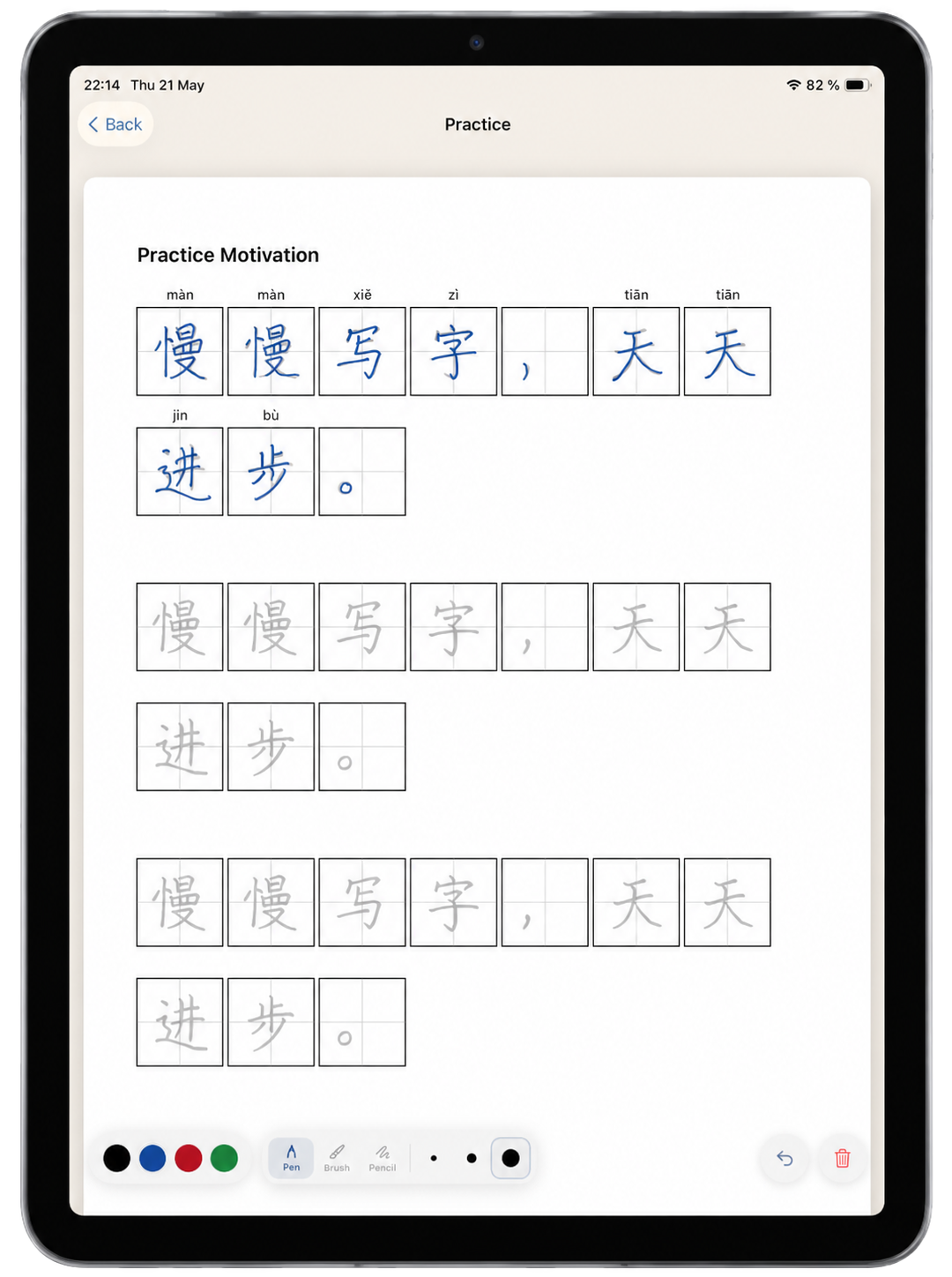
Write directly in the grids on iPad, save the filled page as a separate file, or clear it and begin again. Your clean worksheet stays ready whenever you want to return.

Built for iPad + Apple Pencil
Copybook Club worksheet filled with blue Apple Pencil handwriting on iPad

One page · many rounds

  1. 01

    Write in the grids

    Practice directly on the worksheet with Apple Pencil.

  2. 02

    Clear and repeat

    Reset your writing whenever you are ready for another round.

  3. 03

    Save a filled copy

    Keep your practice without replacing the clean original.

Choose how your writing feels

Basic Scholar is free. Neon Markers and Soft Crayons are included with Pro.

Word Packs · HSK + real-life themes

Useful Chinese, ready to write

Choose HSK vocabulary or a themed collection, select the words you need, and turn them into a Chinese handwriting worksheet. Whole words stay together in every row, with optional translations and stroke order.

New collections / v1.1.2

Pick words → make a worksheet

Street Food / selected word

锅贴

guōtiē · Pan-fried dumplings

Translation on Stroke order on
Practice row Whole-word repeats

More real-life collections

Free essentials and deeper Pro vocabulary.

Milk Tea and Coffee Word Pack icon
Free pack

Milk Tea & Coffee

Trees and Flowers Word Pack icon
Free pack

Trees & Flowers

Doctor Visit and Health Checkup Word Pack icon
Pro pack

Doctor Visit & Health Checkup

Modern Internet Chinese Word Pack icon
Pro pack

Modern Internet Chinese

Core vocabulary

HSK 1 HSK 2 HSK 3 Daily Life
iPad / iPhone / paper

Practice where it feels natural

Create a worksheet on iPhone or iPad. Write with Apple Pencil, save a clean PDF, or print an A4 copy for pen-and-paper practice.

01 / iPad Apple Pencil

Write directly on the page

Create or import a worksheet, add stroke order, and practice with Apple Pencil. Save filled practice separately from the clean original.

02 / iPhone On the go

Build a worksheet anywhere

Start from text, files, photos, or Word Packs. Adjust the page, preview it, and export a clean PDF from your phone.

03 / Paper A4 ready

Take practice offline

Print clean A4 copies for handwriting practice, homework, or class preparation with a pen or pencil.

FAQ · THE USEFUL PART

Questions?
Start here.

Imports, worksheets, Apple Pencil practice, progress, iCloud, and what changes when you go Pro — all in one place.

  • CREATE
  • PRACTICE
  • APP & PRO

Still stuck?

Send us your question.

support@copybookclub.app
01

Create

WORKSHEETS · IMPORTS · WORD PACKS
01 What can I create with Copybook Club?

You can turn your own Simplified Chinese text, imported content, or ready-made HSK and themed Word Packs into clean handwriting worksheets. Adjust the grid, handwriting font, character size, pinyin, tracing, fade, stroke order, and other page settings before exporting.

02 Can I import files and photos?

Yes. Import a PDF, a photo from your gallery, or a DOCX file. Copybook Club recognizes the Chinese text and lets you edit it before creating the worksheet.

03 How do Word Pack worksheets work?

Words stay together in practice rows instead of being split into separate characters. You can add pinyin, show a translation above or below the row, and include stroke-order guides before writing.

04 Which themed Word Packs are available?

Free themed packs include Street Food, Milk Tea & Coffee, and Trees & Flowers. Pro packs include Hot Pot Night, Doctor Visit & Health Checkup, and Modern Internet Chinese. HSK vocabulary packs are also available in the app.

02

Practice

STROKES · APPLE PENCIL · PROGRESS
05 Does Copybook Club show stroke order?

Yes. Add stroke order directly to supported worksheets, with guide cells placed before the practice rows. It is a writing reference, not handwriting grading or automatic correction.

06 Can I save my Apple Pencil handwriting?

Yes. On iPad, save your handwritten practice as a separate filled file. You can also clear the writing layer and keep the original clean worksheet ready for another round.

07 How do Daily Streak, Ink Drops, and Levels work?

Open the app each day to continue your streak and collect 5 Ink Drops. Creating a worksheet adds 20 Ink Drops for each of the first three worksheets that day. Ink Drops raise your level and unlock collectible stickers for your Sticker Notebook.

08 Can I print the worksheets?

Yes. Export a clean A4 PDF for printing, class preparation, or writing by hand on paper. You can also keep the PDF for digital practice on iPad.

Ready to write?

Learn Chinese by hand.

Create personalized Chinese worksheets from your own text, photos, PDFs, DOCX files, or ready-made Word Packs. Practice on iPad or paper, follow stroke order, and build progress you can see.

  • iPad + iPhone
  • Printable A4 PDF
  • EN · RU · ES
Your practice / your way v1.1.2
01 / Learn Unique characters + stroke order
02 / Practice Your full text on iPad or paper
03 / Word Packs HSK and themed vocabulary
Visible progress 05 day streak

Daily streaks, Ink Drops, levels, and collectible stickers turn your routine into visible progress.